ChatGPT vs Gemini vs Grok for Manga: Which AI Makes the Best Art?
ChatGPT vs Gemini vs Grok for Manga: Which AI Makes the Best Art?
We gave all three AI tools the same manga prompt and compared the results. No cherry-picking, no tricks -- just the same request to each tool and an honest look at what came out.
The prompt we used (roughly the same idea given to each):
Create a manga panel in black and white showing a dramatic scene: a warrior facing a massive dragon, with dialogue about ancient power being borrowed from dragons. Dark fantasy style, detailed manga art.
Here are the results.
ChatGPT (DALL-E)
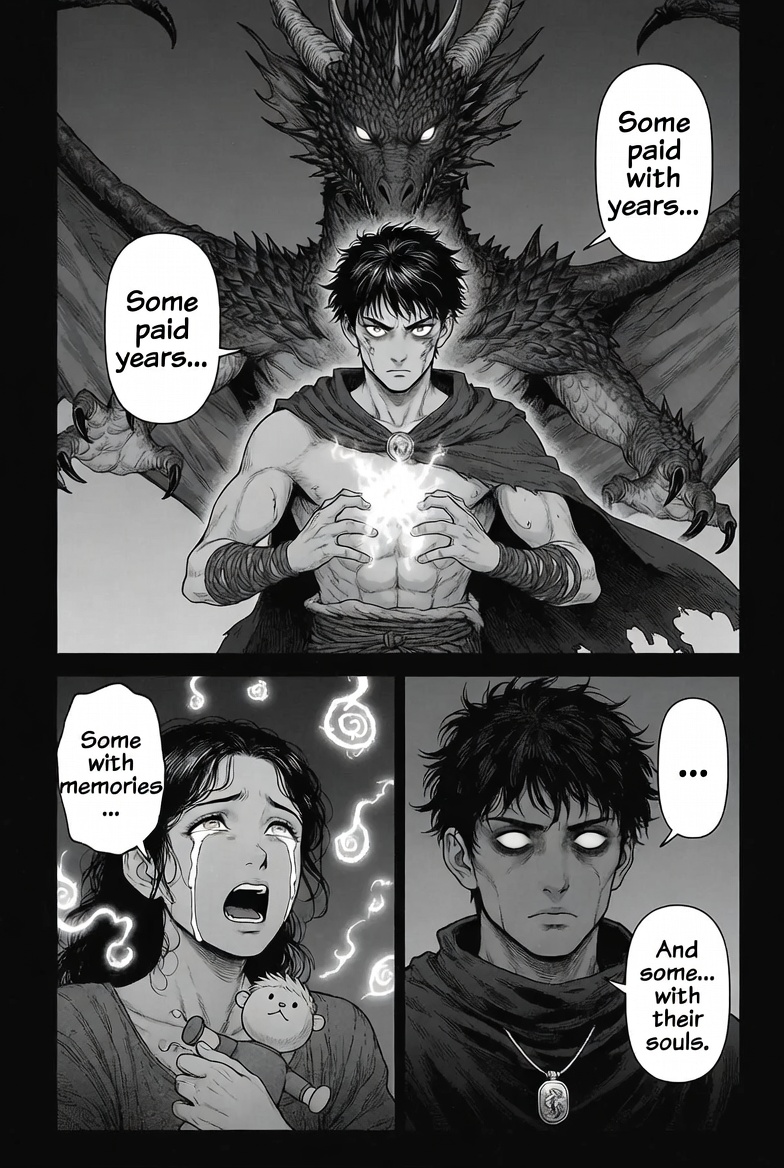
Manga panel generated by ChatGPT. Multi-panel layout showing a warrior with a dragon behind him, a crying woman with memories, and close-up character shots. Speech bubbles are integrated into the art.
What ChatGPT Did Well
- •Multi-panel layout. ChatGPT automatically created a multi-panel page rather than a single image. This is huge for manga creators because you get a full page in one generation.
- •Character expressions. The facial expressions are detailed and emotional -- the crying woman, the determined warrior, the ominous close-up. These are hard to get right with AI.
- •Speech bubbles. The dialogue is integrated into the art with proper manga-style speech bubbles. The text reads: "Some paid with years... Some with memories... And some with their souls."
- •Storytelling. Even without context, this page tells a story. You understand there is sacrifice, loss, and dark power at play.
Where ChatGPT Falls Short
- •Generation speed is moderate. Takes about 20-30 seconds per image.
- •Character consistency across multiple generations is tricky. The characters might look slightly different if you generate another page.
Verdict: Best for full manga page layouts with dialogue. If you want one tool that handles panels, speech bubbles, and storytelling in a single generation, ChatGPT is the winner.
Gemini
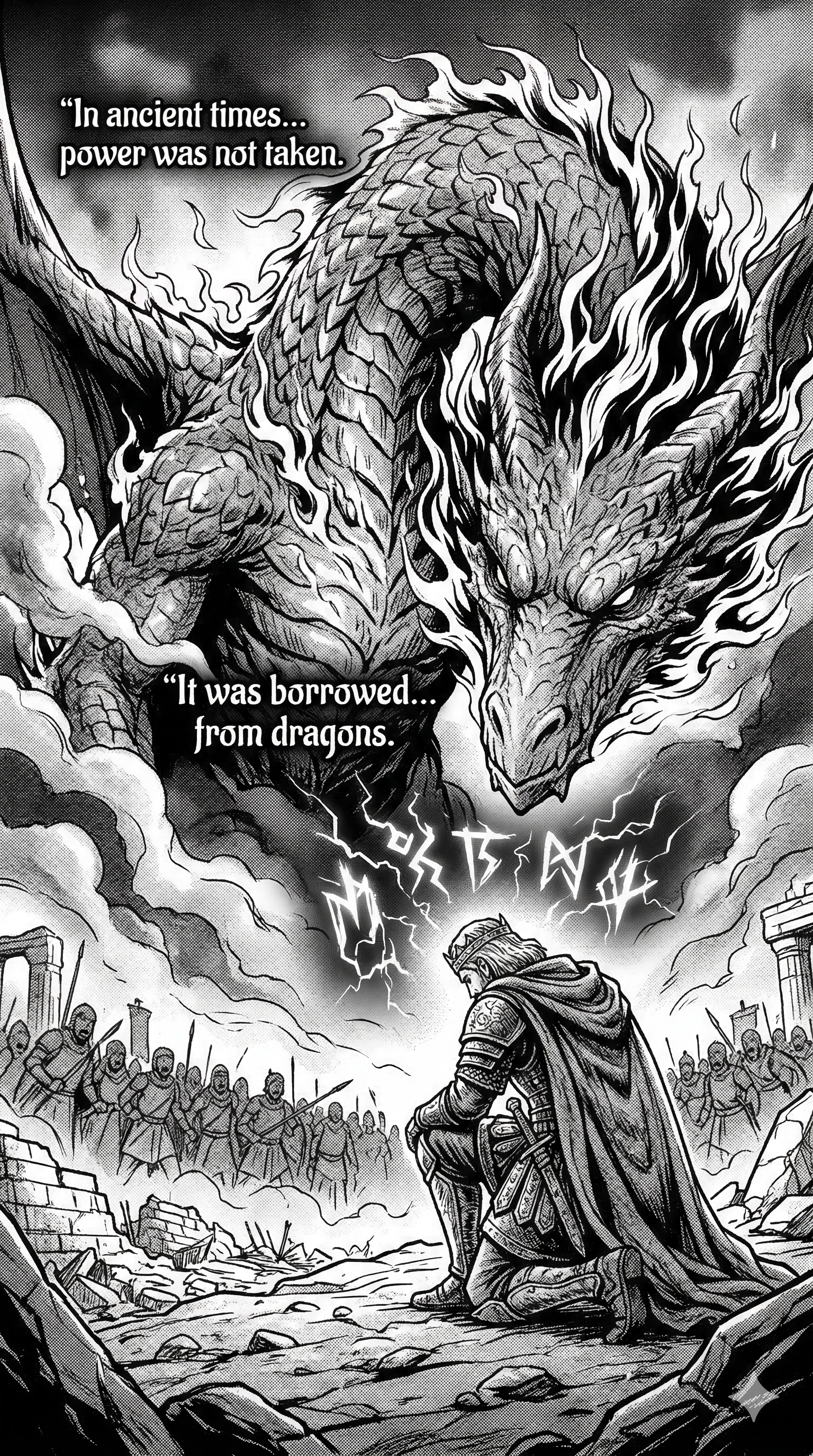
Manga panel generated by Gemini. A single dramatic panel showing a knight facing a massive fire-breathing dragon with an army in the background. Highly detailed with cinematic composition.
What Gemini Did Well
- •Dramatic scale. The sense of scale is incredible -- the dragon towers over the knight and the entire army behind him.
- •Detail level. Look at the soldiers in the background, the rubble in the foreground, the flames around the dragon. Every element is rendered with care.
- •Cinematic composition. The low angle looking up at the dragon creates genuine drama. This is the kind of composition you see in Berserk or Attack on Titan.
- •Text integration. The dialogue "In ancient times... power was not taken. It was borrowed... from dragons" is cleanly placed in the scene.
Where Gemini Falls Short
- •Slowest generation. Can take up to a minute for complex scenes.
- •Single panel focus. Gemini tends to generate one dramatic panel rather than multi-panel layouts.
- •Requires Pro account for the best image quality.
Verdict: Best for splash pages and cinematic moments. When you need that one jaw-dropping panel, Gemini produces the most visually impressive results.
Grok
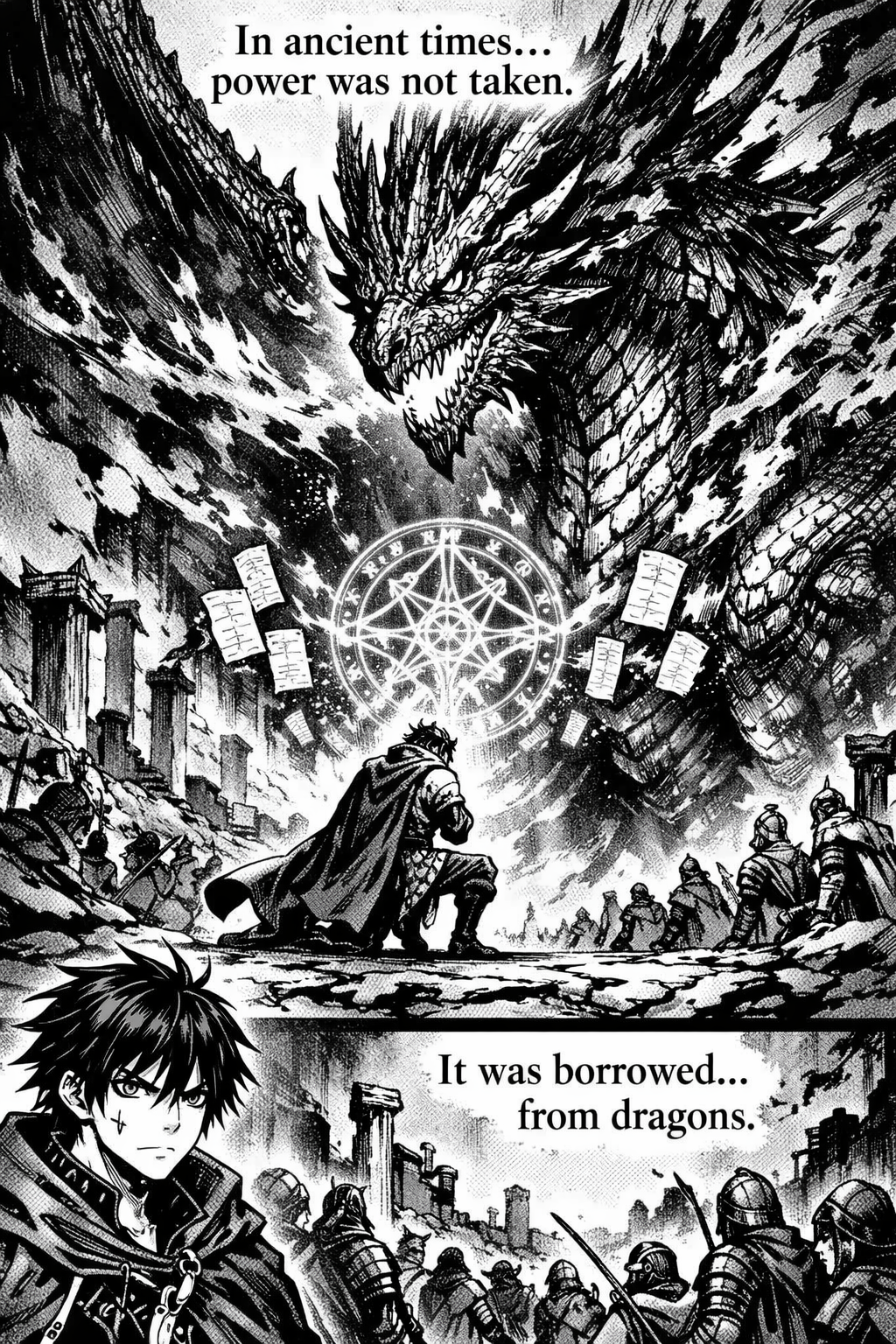
Manga panel generated by Grok. Two-panel layout with a dragon scene featuring a magic circle, detailed army of soldiers, and a warrior. Different art style with more anime-influenced linework.
What Grok Did Well
- •Speed. Grok generated this almost instantly. If you are iterating and experimenting, this speed advantage is massive.
- •Two-panel layout. Unlike Gemini's single panel, Grok gave us a two-panel page with clear scene separation.
- •Unique style. The art style is more anime-influenced with stronger linework and a slightly different character design approach. The magic circle and glowing effects add a nice touch.
- •Free generations available. You can get started without paying anything if you have an X (Twitter) account.
Where Grok Falls Short
- •Text quality. The dialogue text is sometimes less cleanly integrated compared to ChatGPT.
- •Consistency can vary between generations more than the other tools.
Verdict: Best for fast experimentation and free manga creation. Grok is the fastest tool and has a free entry point.
Side-by-Side Comparison
| Feature | ChatGPT | Gemini | Grok |
|---|---|---|---|
| Panel Layout | Multi-panel pages | Single dramatic panels | 1-2 panel layouts |
| Speed | Moderate (20-30s) | Slow (up to 60s) | Fast (nearly instant) |
| Text/Dialogue | Best integration | Good placement | Decent |
| Detail Level | High | Highest | High |
| Cost | $20/mo (cheapest paid) | $20/mo (Pro required) | Free tier available |
| Best For | Full page production | Splash pages | Quick experimentation |
Our Recommendation
For a complete manga workflow, use a combination:
- 1ChatGPT for writing your script scene by scene. It understands story structure and can write panel descriptions perfectly formatted for AI image generation.
- 1ChatGPT or Grok for generating your regular panels. ChatGPT if you want multi-panel layouts. Grok if you want speed and free access.
- 1Gemini for your key dramatic moments -- the double-page spreads, the big reveals, the chapter endings.
- 1Canva or Clip Studio Paint for final page assembly, adding speech bubbles, and polishing.
- 1Webtoon Canvas or Tapas for publishing your finished manga to a real audience.
Budget option: Grok (free) for images + ChatGPT (free tier) for scripting = $0/month.
Best quality option: ChatGPT Plus ($20/month) for everything -- scripting, panel generation, and consistency.
The AI manga creation tools have reached a point where the limiting factor is no longer the art. It is your story. Write something worth reading, and let AI handle the visuals.